
Part Two - Installing GCC
- Make sure that you are not running Cygwin
- Run Cygwin setup again
- Click on "Next" until you reach the "Select Packages" screen
- Find the "Devel" (development) entry (about fifth down), and click on the text "Default" which should change to say "install"
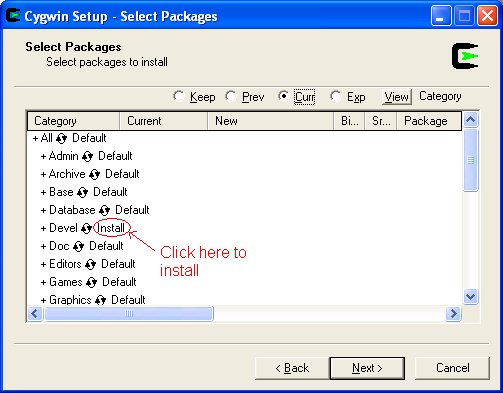
- Click on the next button, and let Cygwin download and install the development tools
- This will take a while, have a cup of tea.
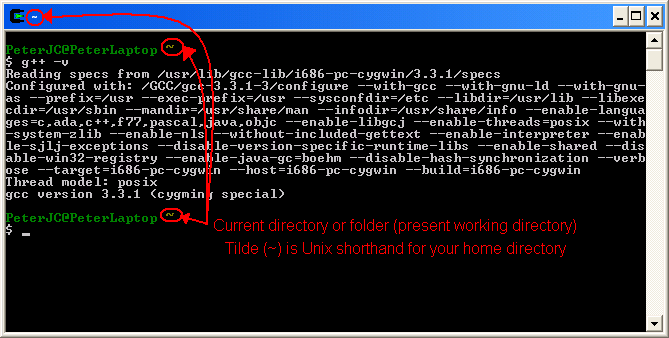
- Once setup is finished, run Cygwin again, and type "g++ -v" to confirm the GCC C++ compiler is installed. This should come up with some version information text.
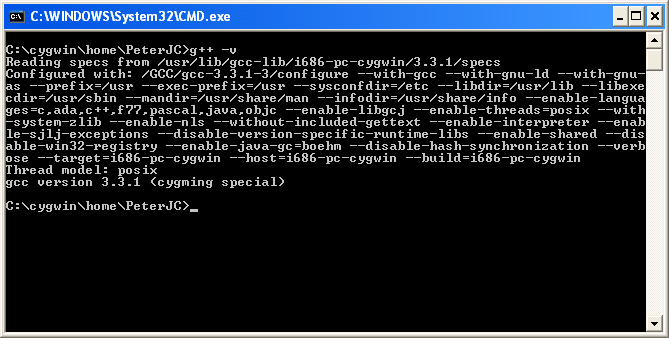
- You can also access the compiler from the Windows Command line ("DOS Screen"). Start menu, run, and type in "cmd". In the black window (windows command line or Dos screen) that appears, type "g++ -v" and enter. This should come up with the same version information text.
Next up, Testing the GCC C++ Compiler.