
Adding my.wbs calendar feeds to your mail.wbs account
Caution:
WBS PhD students receive mail.wbs accounts provided by Google. Many such students find it useful to display calendar information from my.wbs in their mail.wbs calendars and the following instructions explain how to do this. Most WBS Postgraduate students only receive @warwick.ac.uk email accounts provided by Microsoft. Instructions for adding calendar feeds to Outlook are here.
Procedure
- Open a browser window and go to http://my.wbs.ac.uk. Log in with your WBS username (something like FM15xx).
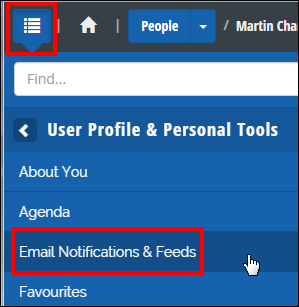
- Click the menu link (top left) and select User Profile & Personal Tools > Email Notifications & Feeds
- Look through the list of Channels to see which you would like to add to your calendar. We expect most students will want to add the Academic Channel so that is the example we show here. You can repeat the steps to add as many channels as you wish.
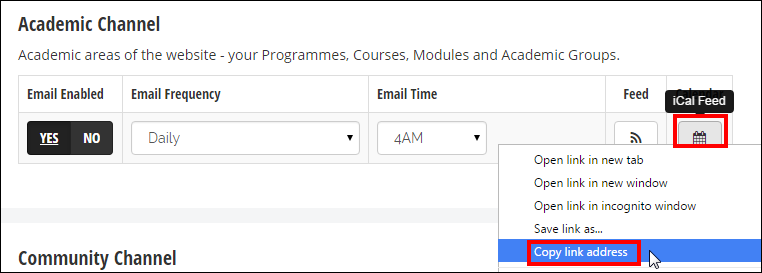
- Locate the Calendar icon next to the Channel to which you would like to subscribe. Right click and select 'Copy Link Address' or similar
- Open a second browser window and go to http://mail.wbs.ac.uk. Log in with your WBS username.
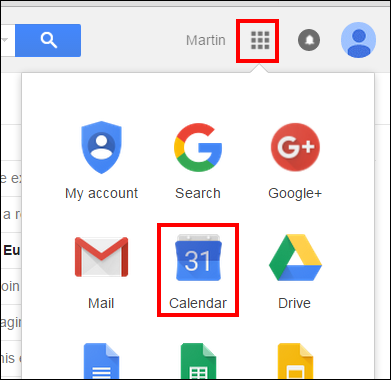
- Open your Google calendar by clicking the '9 squares' icon towards the top right.
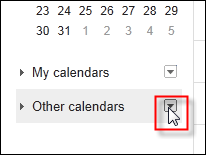
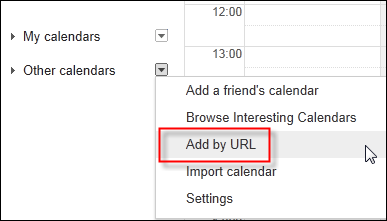
- Locate the 'Other calendars' link in the left menu and click the drop-down arrow adjacent
- Select 'Add by URL' from the options
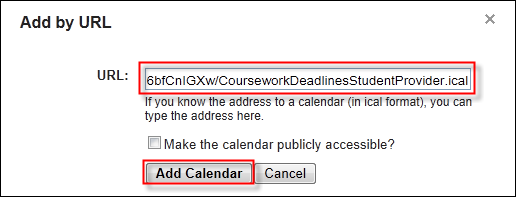
- Paste in the iCAL address you copied earlier and click Add Calendar
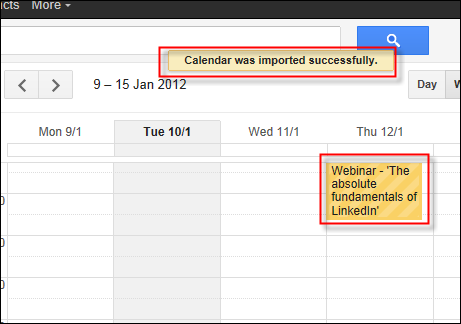
- Note that it may take a few seconds to import the information. On occasion it can also fail. Usually waiting a few seconds and trying again is all that is required. Once complete you should see the information within your mail.wbs calendar.
- Multiple feeds may be added by repeating the process.
If you have any problems please contact help at wbs dot ac dot uk .
0 page comments