Skip to content Skip to navigation
University of Warwick
  • Study
  • |
  • Research
  • |
  • Business
  • |
  • Alumni
  • |
  • News
  • |
  • About
  • Text only
  • |
  • Sign in
  • Search IT Services
  • Search University of Warwick
  • Search for people at Warwick
  • Search Warwick Blogs
  • Search past exam papers
  • Search video
  • More…

    IT Services

    • Services & support
    • News & initiatives
    • About ITS
    • Web Publishing Service »
    • Warwick Blogs »
    • FAQs »
    • FAQs about sidebars »
    • How do I provide a copyright statement on my blog? »
    • Types of Creative Commons license
    University of Warwick

    How do I provide a copyright statement on my blog?

    By default, you blog is protected by your own copyright, and nobody will be able to use any of the material that you provide without your explicit permission. By adding a Creative Commons license to your blog, you are providing conditions whereby other people can use your work.

    1. Go to your Sidebar admin page by clicking the "Admin" link at the top right of your blog (whilst signed in) and then clicking on the Sidebar link to see a list of items on your sidebar.
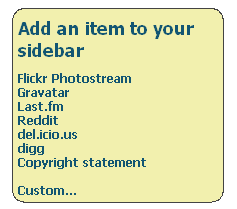
    2. Click on the Copyright statement link from the "Add an item to your sidebar" box on the right hand side

      Add an item to your sidebar
    3. Select the type of license you wish to have. You can find more information about Creative Commons licenses by reading What types of Creative Commons license are there?
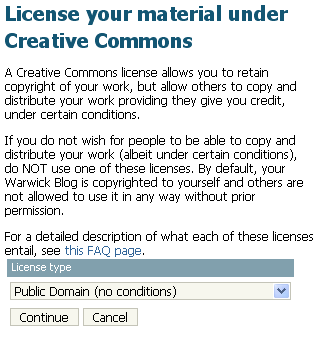
      Enter your Creative Commons license
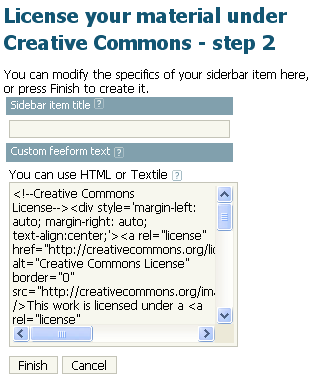
    4. Modify any extra details


      Modify any other details

      For more information on what these fields mean, see How do I create a custom text or image sidebar item?
    5. Click Finish. Your sidebar item has now been created, and you can see it on your blog:
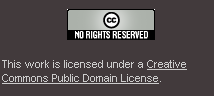
      Creative Commons in sidebar

    Related FAQ items

    What is my sidebar?

    What types of Creative Commons license are there?

    Need help? Use our online IT Services Help Desk at any time to log or track a call. Or phone us between 9:00 and 17:30 Monday to Friday on 024 76573737
    Close this email form
    Page contact: ITS Web Team Last revised: Wed 21 Mar 2007
    • Sign in
    • |
    • Powered by Sitebuilder
    • |
    • © MMXII
    • |
    • Privacy
    • |
    • Accessibility